Schema Integrity Check
BPP keeps a record of your dataset's structure — its tables and fields — so that audiences, signals, and AI models always know what data is available. Your BigQuery dataset, however, is your own and can change independently (for example, when your data team adds or removes a column).
The Schema Integrity Check runs automatically at login and compares what BPP has on record against the actual, live structure of your BigQuery dataset. If the two no longer match, BPP lets you know rather than silently working with an outdated picture of your data.
Where you'll see it
| Where | What you'll see |
|---|---|
| At login | A notice listing which tables are affected and what changed, if any mismatch is detected. |
| Tables Configuration | A warning icon next to affected tables and fields. Hover over it for details on the specific mismatch. |
A column that already exists in BigQuery but hasn't been registered in BPP yet can only be flagged at the table level, since there isn't a corresponding row in BPP to attach the warning to. In this case, hover over the table's icon to see which column(s) are involved.
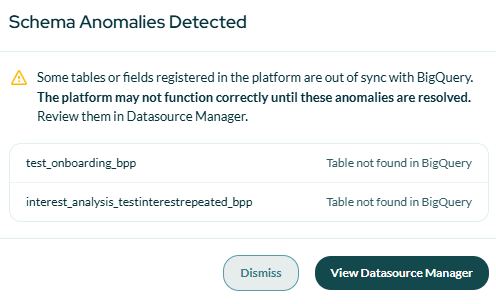
The modal shown after login when anomalies are detected.
What a mismatch usually means
- A column exists in BigQuery but hasn't been registered in BPP yet — common after a change made directly in your data warehouse.
- A column or a table were previously registered in BPP but no longer exist in BigQuery. When they were removed from your source dataset, the warning says Removed from the source table (or Table removed from the source dataset).
- The unified user model table is out of date. Right after you save the user model, its fields are shown as being rebuilt — this is expected and clears by itself. If the rebuild fails, the warning says The user model rebuild failed.
What to do
Not every anomaly affects how the platform behaves day-to-day — some are harmless, such as a new column BPP hasn't picked up yet. Others can, for example if a table or field that an audience, signal, or AI model relies on has disappeared from BigQuery.
- A new or changed column on a table BPP already knows about — this is self-serve. Open Add Tables; the drifted column appears there with a New! badge, and accepting it writes a scoped schema update without a full re-onboarding.
- A table or field that disappeared from BigQuery — this isn't self-serve. Reach out to your BPP contact — they can review it with you and, if needed, update the registered schema to match your current dataset.